
Notice to File Corrected Application Papers: How to Fix Your Drawings
What a Notice to File Corrected Application Papers or a drawing objection means, how to correct the drawings with replacement sheets under 37 CFR 1.121(d), and how to meet the deadline.
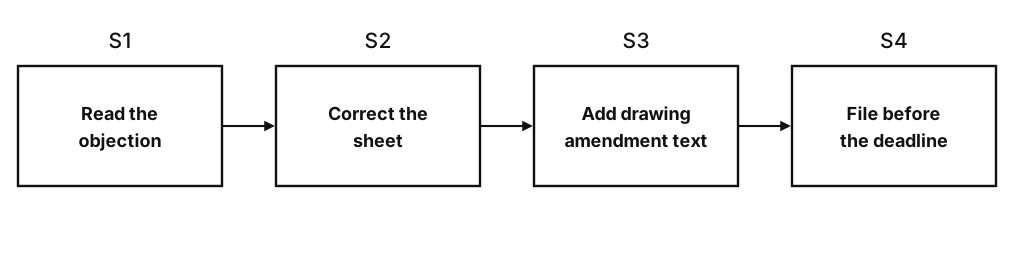
A Notice to File Corrected Application Papers is the USPTO telling you that something you filed, very often the drawings, does not meet the formal requirements and has to be fixed within a set time. A drawing objection in an office action is the same problem raised during examination. Both are answered the same way: correct the sheets, send them as replacements, and say in the response what changed. The drawing rules are in 37 CFR 1.84, the way to amend them is 37 CFR 1.121(d) (explained in our 1.121 guide), and examiners follow MPEP 608.02.
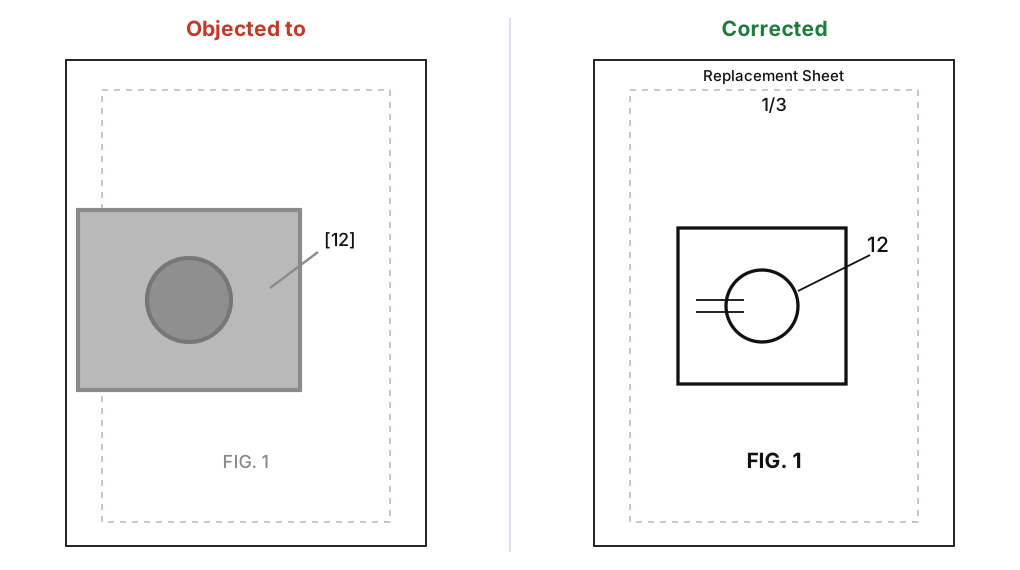
Read what was objected to
The notice or office action names each problem and usually cites a paragraph of 1.84. List them per sheet before touching anything. The usual ones:
- Line quality (1.84(l)). Grey, blurry or anti-aliased lines, or lines of uneven weight. Fix: redraw or re-export as solid black on white.
- Margins (1.84(g)). A figure or label outside the sight area. Fix: move or scale the figure inside the margins.
- Reference numerals (1.84(p)). Numerals under 0.32 cm, in brackets, or on top of hatching. Fix: plain numerals at the right size in clear space.
- Numerals and description out of step (1.84(p)(5)). A number appears on only one side. Fix: correct the drawing, or amend the description if the number belongs there.
- Lead lines (1.84(q)). Crossing lines, or lines that end in empty space.
- Figure and sheet labels (1.84(t), (u)). Missing "FIG.", numbering out of order, no n/N sheet number.
- Shading and color (1.84(a), (m)). Solid black fills, grey tones, or color without a petition.
Our 37 CFR 1.84 guide walks through each paragraph in order, so you can look up the one the examiner quotes.
Correct the sheet without adding anything
Fix the objected-to problem and nothing else. A correction can change how a figure looks; it can't add something the original application didn't show, because new matter is barred by 35 U.S.C. 132. If an objection says a feature in the claims isn't shown (1.83(a)), that is a different problem: the part has to be supported by the original disclosure, and adding it is a decision for you and your attorney.
Keep the same figure numbers and the same reference numerals as the filed sheet, so the replacement lines up with the description. Our reference numbers guide covers the numeral rules in detail.
Send replacement sheets
Under 1.121(d), drawings are amended by replacing sheets, not by marking up the old ones.
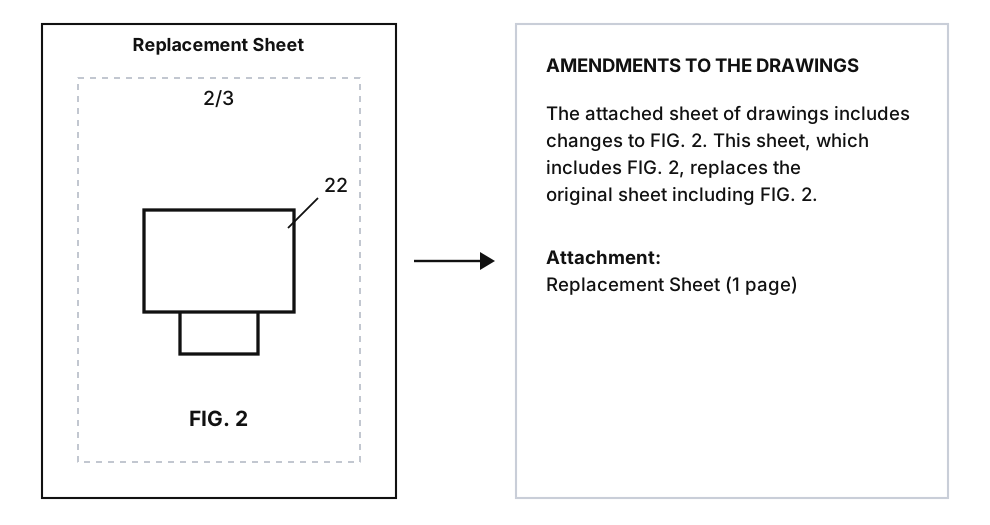
- Mark each corrected sheet "Replacement Sheet" in the top margin, with the same sheet number it had.
- Include every figure that was on that sheet, even if only one changed.
- Add an "Amendments to the Drawings" section to the response, saying which figures changed and which sheet replaces which: "The attached sheet of drawings includes changes to FIG. 2. This sheet, which includes FIG. 2, replaces the original sheet including FIG. 2."
- Attach the sheets and list them as attachments.
An examiner can also ask for an annotated sheet that shows the changes, so keep the original and the replacement side by side in case they do.
Watch the deadline
The notice states the time period. Under 1.85(c), corrected drawings are due within that period and in any case no later than payment of the issue fee. If you need longer, an extension of time under 37 CFR 1.136(a) may be available for a fee, so check the date as soon as the notice arrives.
Before you file the response
- Every objected-to point is fixed, on every sheet where it appeared.
- Lines are solid black, text is at least 0.32 cm, and everything sits inside the margins.
- Each corrected sheet says "Replacement Sheet" and has its n/N sheet number.
- Each replacement contains all the figures of the sheet it replaces.
- Numerals match the description in both directions.
- The response has an "Amendments to the Drawings" section.
- Nothing was added that the original application didn't show.
PatentStroke's patent drawing objection fix reads the notice, moves each filed drawing inside the margins in black and white, and exports replacement sheets with the amendment text for you to review. Run any sheet through the figure checker before you send it. More about making patent drawings from photos, sketches and claims is on the home page.
Frequently asked questions
What is a Notice to File Corrected Application Papers?
A USPTO notice that tells the applicant a filed paper, often the drawings, does not meet the formal requirements and must be corrected. It sets a time period to respond, usually two months, and says what was wrong. Read the notice itself and check the deadline with your patent attorney or agent.
How do I submit corrected drawings?
As replacement sheets. Under 37 CFR 1.121(d) each corrected sheet is marked "Replacement Sheet" in the top margin, contains every figure that was on the sheet it replaces, and comes with an "Amendments to the Drawings" section in the response that says which figures changed.
Can I add new features when I correct the drawings?
No. Corrections must not add new matter (35 U.S.C. 132). A fix for margins, line quality, numerals or figure labels is a formal change; adding a part the original application did not show is not allowed.
How long do I have to respond?
The time period is stated in the notice or office action. Under 37 CFR 1.85(c) corrected drawings are due within that period and no later than the date the issue fee is paid. Extensions of time may be available under 37 CFR 1.136(a) for a fee.
Do I have to redraw the whole set?
Only the sheets that were objected to. A replacement sheet must include all the figures on that sheet, even if only one needs the change, but sheets with no objection stay as filed.