System block diagram
Patent Block Diagram Generator
Describe your system in plain words and get a patent block diagram: each component in a labelled box with a reference numeral, connections drawn as lines and arrows, the whole system inside its boundary box.
Input
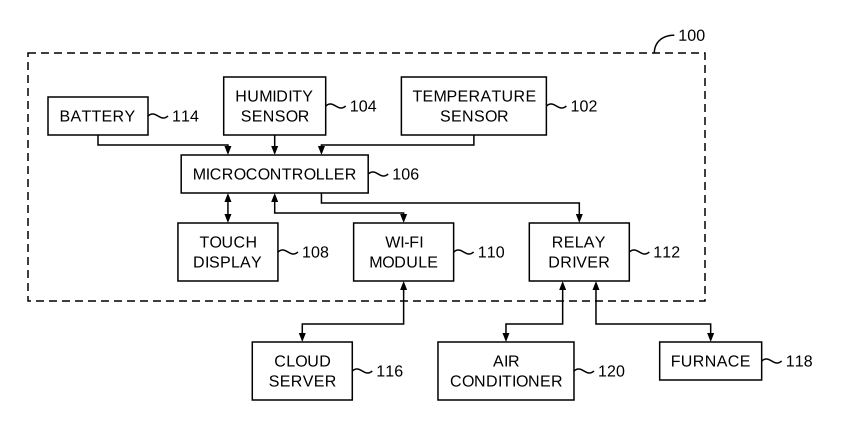
A smart thermostat system with a temperature sensor, a humidity sensor and a battery feeding a microcontroller. The microcontroller drives a touch display, a Wi-Fi module that talks to a cloud server, and a relay driver that switches an air conditioner and a furnace.
5 credits per diagram. Sign up free: 30 credits on day one, then 10 a day.
System claims to block diagrams in a minute
Reference numerals
The system is 100 and its components 102, 104 and onward, placed outside the boxes with lead lines.
Connections that read
Data and power flows become arrows; two-way links get two-way arrows.
External parts
Parts outside the system, such as a cloud server or a user device, are drawn outside the boundary box.
Readable on the sheet
Text stays at least 0.32 cm tall; large diagrams are split over sheets.
Vector export
Export vector PDF, 300 DPI PNG or SVG.
5 credits a diagram
Half the price of an image figure, usually ready in under a minute.
When an application needs a block diagram
System and apparatus claims for electronics, software and networked devices are usually shown as block diagrams: each claimed component as a labelled box, with the connections between them. The numerals tie each box to its description.
A block diagram is often FIG. 1 of a software application, with flowcharts of the methods following it.
How to make a patent block diagram
- Sign up, open the diagram generator and choose Block diagram.
- Describe the system: its components and what connects to what.
- Generate. Components are boxed, numbered and connected.
- Add the diagram to a sheet set and export PDF, PNG or SVG.
Tips for clear input
- Name each component once and use the same name every time.
- Say what connects to what: "the sensor sends readings to the controller".
- Say which parts are outside the system, such as a remote server.
Patent block diagram FAQ
Related tools
Need the drawing itself?
Generate patent line art from a photo or sketch, or a flowchart from a claim, and lay it out on USPTO sheets.
Start creating