
Patent Drawing Requirements: USPTO Checklist (37 CFR 1.84)
Patent drawing requirements for US utility applications, rule by rule: paper size, margins, lines, views, reference numerals, FIG. labels and sheet numbers.
Patent drawing requirements for US applications are set out in 37 CFR 1.84, with the duty to include drawings in 1.81 and the duty to show every claimed feature in 1.83. The rule is long, but most problems come from a handful of items: margins, line quality, text size, view and sheet numbering, and reference numerals that don't match the description. This checklist walks through them in the order an examiner would notice them.
Key facts
- Paper: US Letter (21.6 × 27.9 cm) or A4 (21.0 × 29.7 cm), one side only, every sheet the same size (1.84(f)).
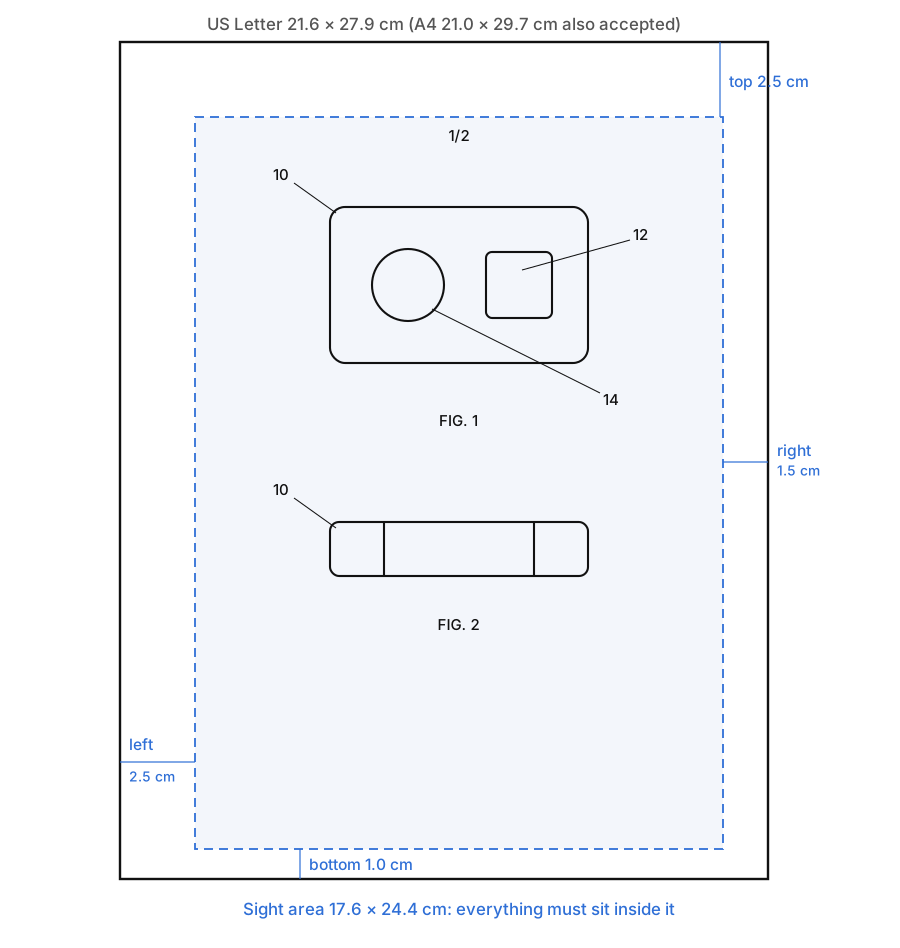
- Margins: at least 2.5 cm top, 2.5 cm left, 1.5 cm right, 1.0 cm bottom, with no frame (1.84(g)).
- Lines: solid black on white, dark, uniform and well defined; no grey and no color without a petition (1.84(a) and (l)).
- Text: numbers and letters at least 0.32 cm (1/8 inch) tall (1.84(p)).
- Numbering: views labelled FIG. 1, FIG. 2…; sheets numbered 1/3, 2/3, 3/3 at the top centre (1.84(t) and (u)).
When a patent application needs drawings
A drawing is required whenever it is needed to understand the invention (37 CFR 1.81(a) and 35 U.S.C. 113). In practice that covers almost every mechanical, electrical and software application. The drawings must show every feature that the claims recite (1.83(a)). Conventional parts that are not the point of the invention may be shown as a graphical symbol or a labelled box.
Drawings filed with the application set the limit of what you can show later. You can fix their form, but you cannot add new matter afterwards (35 U.S.C. 132), so a feature that appears in neither the text nor the drawings at filing cannot be added later.
Sheet size, paper and margins
| Item | Requirement | Rule |
|---|---|---|
| Sheet size | 21.6 × 27.9 cm (8½ × 11 in) or 21.0 × 29.7 cm (A4); all sheets the same | 1.84(f) |
| Top margin | at least 2.5 cm | 1.84(g) |
| Left margin | at least 2.5 cm | 1.84(g) |
| Right margin | at least 1.5 cm | 1.84(g) |
| Bottom margin | at least 1.0 cm | 1.84(g) |
| Sight area | 17.6 × 24.4 cm (Letter), 17.0 × 26.2 cm (A4) | 1.84(g) |
| Frame | not allowed around the sight area | 1.84(g) |
| Holes | none made by the applicant | 1.84(x) |
For electronic filing in Patent Center the drawings go in as a PDF, so "paper" means the page size of that PDF. Keep every page the same size and orientation, with the short side at the top. If a figure is wider than it is tall, you may turn it so that the top of the figure is on the right side of the sheet (1.84(i)).
Lines, shading and color
- Black and white only. Drawings use black ink, or its digital equivalent, on a white background (1.84(a)(1)). Grey fills, gradients and anti-aliased photos are the most common reason an AI or CAD export gets rejected.
- Color needs a petition under 1.84(a)(2), with a fee and a reason color is necessary. Most applicants never need it.
- Line quality. Every line must be dense, dark, uniformly thick and well defined, so it survives reduction and scanning (1.84(l)).
- Shading is allowed when it helps show shape, as long as it does not hide detail. Use spaced lines, with light coming from the upper left at 45°. Solid black areas are not allowed except in bar graphs or to stand for color (1.84(m)).
- Photographs are only for subjects that cannot be drawn, such as gels, micrographs and cell cultures (1.84(b)). They must be black and white unless a color petition is granted.
Views and how to arrange them
37 CFR 1.84(h) lists the views you can use: plan, elevation, section and perspective views, plus detail views of a part at larger scale.
- Exploded views show the parts separated, held together by a bracket. If the exploded view is on the same sheet as other figures, put it in brackets.
- Sectional views need the cutting plane marked on the view it was taken from, with a broken line and the section's view number at each end, and arrows showing the direction of sight. Cut surfaces are hatched with evenly spaced oblique lines.
- Alternate positions of a moving part can be drawn in broken lines on the same view, if that stays clear.
- Arrangement: don't put one view inside or on top of another, and keep all views on a sheet facing the same way (1.84(i)).
- Scale: large enough that the drawing stays readable when reduced to two-thirds. Notes such as "actual size" or "scale 1/2" are not allowed (1.84(k)).
Our patent drawing examples show each of these view types side by side.
Reference numerals and lead lines
Reference numerals are where most office actions on drawings come from, because they have to match the written description exactly.
| Requirement | Rule |
|---|---|
| Plain, legible numbers and letters, not in brackets or quotes and not circled | 1.84(p)(1) |
| At least 0.32 cm (1/8 inch) tall | 1.84(p)(3) |
| Kept clear of close, complex detail and never crossing lines; on hatching or shading, leave a blank space around them | 1.84(p)(3) |
| The same part keeps the same numeral in every view; one numeral never names two parts | 1.84(p)(4) |
| Every numeral in the drawings appears in the description, and every numeral in the description appears in the drawings | 1.84(p)(5) |
| Lead lines run from the numeral to the part, as short as possible, and do not cross each other | 1.84(q) |
A common convention, not a rule, is to number parts 10, 12, 14 and so on, so a part added later can take an odd number in between. Main assemblies can take 100, 200, 300 with their parts 102, 104 and so on.
FIG. labels and sheet numbers
- Views are numbered FIG. 1, FIG. 2… in order, independent of the sheet they are on. Related partial views use capital letters: FIG. 1A, FIG. 1B (1.84(u)).
- A single view is not labelled "FIG." at all.
- Sheets are numbered at the top centre, but not in the margin, as two numbers separated by a slash: 1/3, 2/3, 3/3 (1.84(t)).
- Both view and sheet numbers must be larger than the reference numerals.
- Text is limited to what is needed: a few words in a legend, such as "water", "open", "start" (1.84(o)).
Flowcharts and block diagrams
Software, method and electrical applications usually show the invention as a flowchart or block diagram. These are drawings under the same rule, so the same margins, line and text sizes apply. Each box carries a short label and a reference number. Flowchart steps are often numbered S101, S102…, and the blocks of a system 100, 102, 104…. Keep the words inside each box short and match them to the description.
Pre-filing checklist
- Every sheet is Letter or A4, all the same size, with the margins above and no frame.
- Only solid black lines on white. No grey, no color, no photo backgrounds.
- All text at least 0.32 cm tall; FIG. and sheet numbers larger than numerals.
- Views numbered FIG. 1… in order; sheets numbered n/N at the top centre.
- Every claimed feature is shown in at least one figure.
- Every numeral matches the description, in both directions, and each part keeps one numeral.
- Lead lines are short, touch the part and don't cross.
- Section lines are marked, with view numbers and arrows.
- The PDF is legible at two-thirds size.
PatentStroke lays out every exported sheet to these rules, including margins, FIG. labels, n/N sheet numbers and minimum text height, and exports vector PDF, 300 DPI black-and-white PNG or SVG. To check drawings you already have, the figure checker gives an itemised report on margins, resolution, color, line weight, numeral height and figure labels (sign-in required, 20 credits a check). The check covers form only, so compare each figure with your invention before you file.
Frequently asked questions
What are the USPTO margin requirements for patent drawings?
Under 37 CFR 1.84(g) each sheet needs a top margin of at least 2.5 cm, a left margin of at least 2.5 cm, a right margin of at least 1.5 cm and a bottom margin of at least 1.0 cm. That leaves a sight area of 17.6 × 24.4 cm on US Letter paper and 17.0 × 26.2 cm on A4. Frames around the sight area are not allowed.
Can patent drawings be in color?
Not by default. 37 CFR 1.84(a) requires black ink on white paper. Color drawings are accepted only after a petition under 1.84(a)(2) is granted, which requires a fee and an explanation of why color is necessary.
How big must numbers and letters be in a patent drawing?
At least 0.32 cm (1/8 inch) tall, under 37 CFR 1.84(p)(3). FIG. labels and sheet numbers should be larger than the reference numerals.
Are photographs accepted as patent drawings?
In a utility application, only when the invention cannot be shown in an ink drawing, such as gels, cell cultures or metal microstructures (37 CFR 1.84(b)). Design applications may use photographs instead of drawings under 37 CFR 1.152, but not both in one application.
What happens if my patent drawings do not meet the requirements?
The USPTO can object to the drawings or send a notice asking for corrected drawings, which delays the application. Replacement sheets must be labelled "Replacement Sheet" and cannot add new matter.