
Patent Flow Chart: How to Draw One From a Method Claim
How to turn a method claim into a patent flow chart: one box per claim step, decisions and loops, short legends, step numbers, and splitting a long method across sheets under 37 CFR 1.84.
A patent flow chart shows a method claim as a sequence of steps. It is the usual way to meet the rule that the drawings show every feature in the claims (37 CFR 1.83(a)), because a process has no shape to draw. The flow chart is a drawing like any other: it follows 37 CFR 1.84 for margins, line quality, text size and numbering, and examiners apply it as described in MPEP 608.02. This guide goes from a claim to a figure you can file.
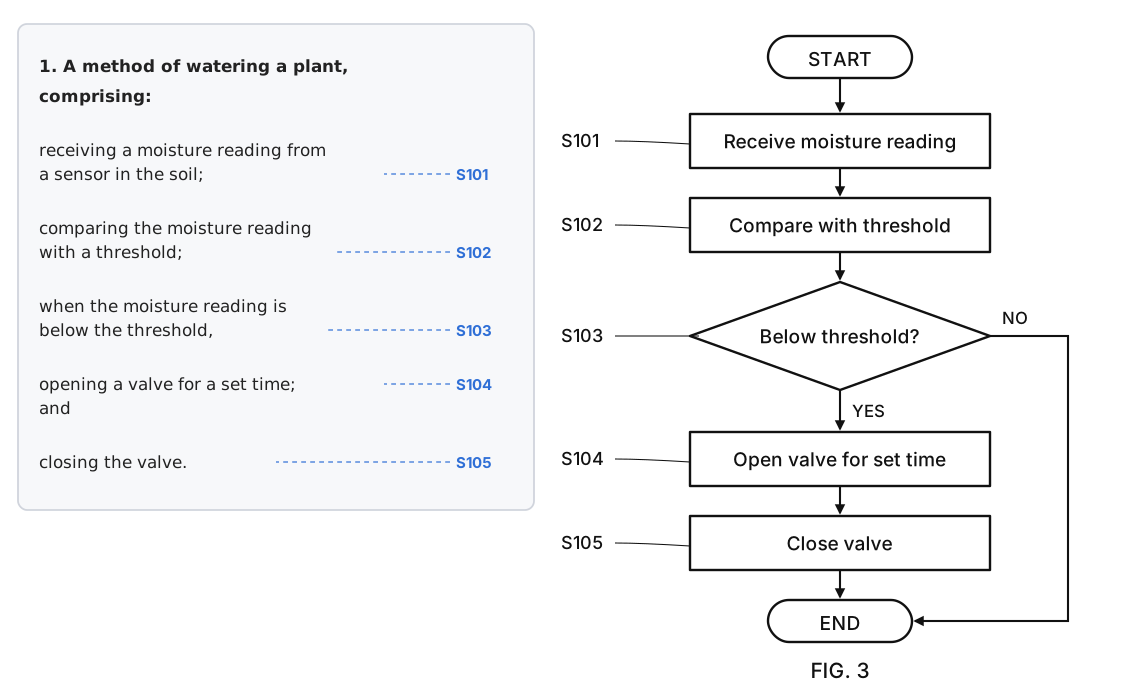
Start from the claim, one box per step
Read the method claim and break it at the semicolons. Each step becomes one box, in the order the claim recites it. In the example above, the claim has four actions (receive, compare, open, close), and the flow chart has a box for each.
- Keep the claim's verbs. "Receiving" becomes "Receive", "comparing" becomes "Compare". An examiner checking the drawing against the claim should find each step without translating.
- Don't add steps the claim doesn't have. Extra boxes can be useful in the description, but a box that matches nothing in the claim makes the reader wonder whether something is missing.
- Don't drop steps. A claimed step that has no box is a feature that isn't shown, which is what 1.83(a) asks you to avoid. If a step is a conventional operation, the rule allows a labelled box for it.
- Show the order the claim implies. If the claim says "after" or "while", the arrows should say the same thing.
You can't add a step to the drawings after filing that the original application doesn't support (35 U.S.C. 132), so it is worth drawing the whole claim set's methods up front, including dependent claims.
Decisions, loops and conditions
Claim language like "when the reading is below the threshold" or "if the request is valid" is a decision. Draw it as a diamond with one question inside and a labelled arrow for each outcome (YES and NO are legends, which 1.84(o) allows).
- One question per diamond. Phrase it so the answer is yes or no.
- Every branch ends somewhere. Join it back into the flow or send it to an END terminal. A branch that stops in the middle of the page looks like a missing step.
- Loops go back with an arrow. "Repeating until" becomes a decision with an arrow returning to the step before it.
- Parallel steps split and rejoin. Show them side by side with the arrows leaving the same box.
START and END terminals are optional but make it clear where the method begins and stops. Use the same shapes throughout: boxes for actions, diamonds for decisions, rounded terminals. Known symbols should be ones with a recognised meaning (1.84(n)); if you invent a symbol, the description has to explain it.
Keep the words short
Text in a box is the part examiners object to most often. The rule asks for legends with as few words as possible (1.84(o)), and letters and numbers have to be at least 0.32 cm tall (1.84(p)(3)). A sentence in a box forces the text below that size.
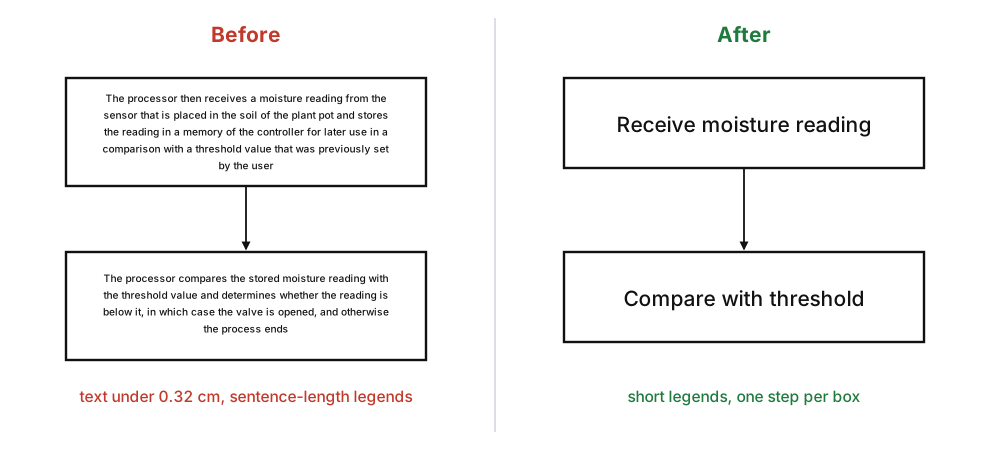
A reliable pattern is a verb plus an object, three to five words: "Receive moisture reading", "Open valve for set time". Put the detail in the description, not the box. If a box needs a paragraph to be understood, the claim step is probably two steps.
Long methods across sheets
When the flow chart won't fit on one sheet, split it and keep one figure number. Under 1.84(u), partial views that form one complete view are identified by the same number followed by a capital letter: FIG. 4A on one sheet, FIG. 4B on the next. Each sheet keeps its own n/N sheet number (1.84(t)).
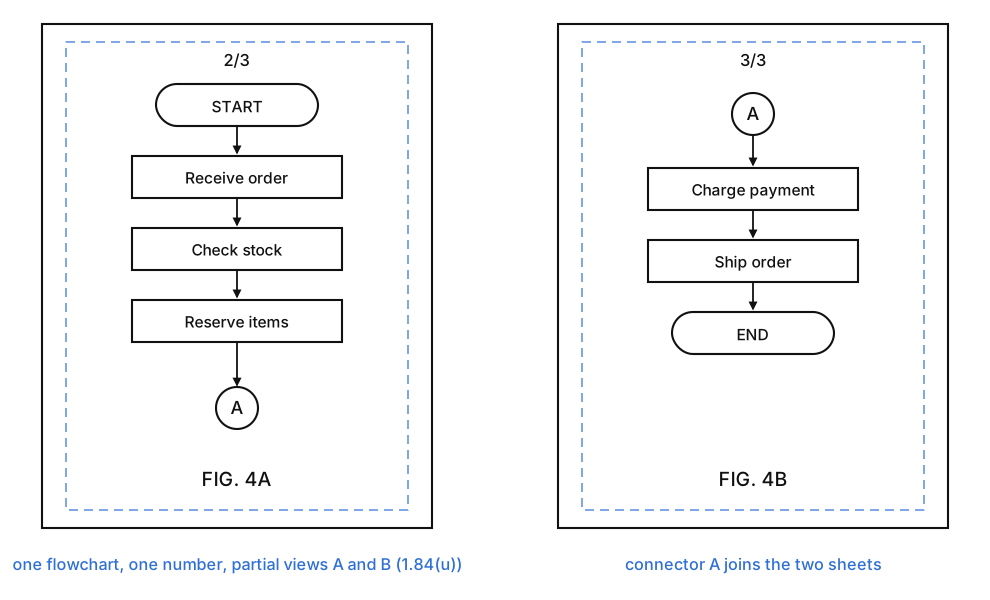
Connector circles with a letter are the common way to show where the flow carries on. The rule doesn't mention them, so explain them in the description ("the flow continues at connector A in FIG. 4B"). Break the chart at a natural pause, such as after a decision has resolved, rather than in the middle of a branch.
Number the steps and match the description
Flow chart steps are reference characters, so 1.84(p) applies to them. A common scheme is S101, S102, S103, or 202, 204, 206. Each number gets a lead line to its box, and the lead lines mustn't cross (1.84(q)).
Then close the loop with the written description, in both directions:
- Brief description of the drawings: "FIG. 3 is a flow chart of a method of watering a plant."
- Detailed description: mention each step by number and name, in order: "At step S101, the controller receives a moisture reading…".
- Check both ways. Every step number in the figure appears in the text, and every step number in the text appears in the figure (1.84(p)(5)).
Our reference numbers guide covers placing numerals and lead lines in more detail.
Before you file
- Every claimed step has a box, in the claimed order.
- Decisions have one question each and a labelled arrow for every outcome.
- Legends are short and at least 0.32 cm tall.
- Steps are numbered, with lead lines that don't cross.
- A multi-sheet chart shares one number with letters, and connectors are explained.
- Step numbers match the description in both directions.
- The sheet has the margins and n/N sheet number the rule requires.
PatentStroke's patent flowchart generator does the first draft from the claim: paste a method claim or a description and it drafts a flow chart with numbered steps and short legends, laid out on a USPTO sheet. A figure costs 10 credits. Review the result against your claim and your description before you file, as with any drawing. For a flow chart you already have, the figure checker tests margins, line weight, text height and figure labels. More about making patent drawings from text, photos and sketches is on the home page.
Frequently asked questions
Does a method claim need a flow chart?
A drawing is required when it is needed to understand the invention (37 CFR 1.81(a)), and 37 CFR 1.83(a) says the drawing must show every feature specified in the claims. A process is hard to show any other way, so most applications with method claims include a flow chart. Check the requirements for your application with your patent attorney or agent.
How many words can go in a flow chart box?
As few as possible. 37 CFR 1.84(o) asks for legends with as few words as possible, and 1.84(p)(3) requires letters and numbers at least 0.32 cm (1/8 inch) tall, which is a hard limit on how much text fits in a box. A short verb phrase such as "Compare with threshold" works; a sentence does not.
How should the steps in a flow chart be numbered?
Reference characters such as S101, S102, S103, or 202, 204, 206, each with a lead line to its box. They are reference characters under 37 CFR 1.84(p), so each one must also appear in the description, and the description should not mention a step number that is not in the drawing.
Can a flow chart run across more than one sheet?
Yes. Under 37 CFR 1.84(u), partial views that together form one complete view can be on several sheets and share a figure number with capital letters, such as FIG. 4A and FIG. 4B. Connector circles are commonly used to show where the flow continues, and the description should explain them.
Is a flow chart a flowchart or a flow diagram in patent drawings?
The terms are used interchangeably. The USPTO rules do not define a flow chart format, so the same drawing rules apply to it as to any other figure: black and white lines, margins, text height, figure and sheet numbers.